Beautiful PDFs
from Markdown
MDash turns Markdown — including whatever ChatGPT or Claude just handed you — into a clean, print-ready PDF. No LaTeX, no setup, no cloud.

Try for free today · macOS 15+ · Apple silicon & Intel
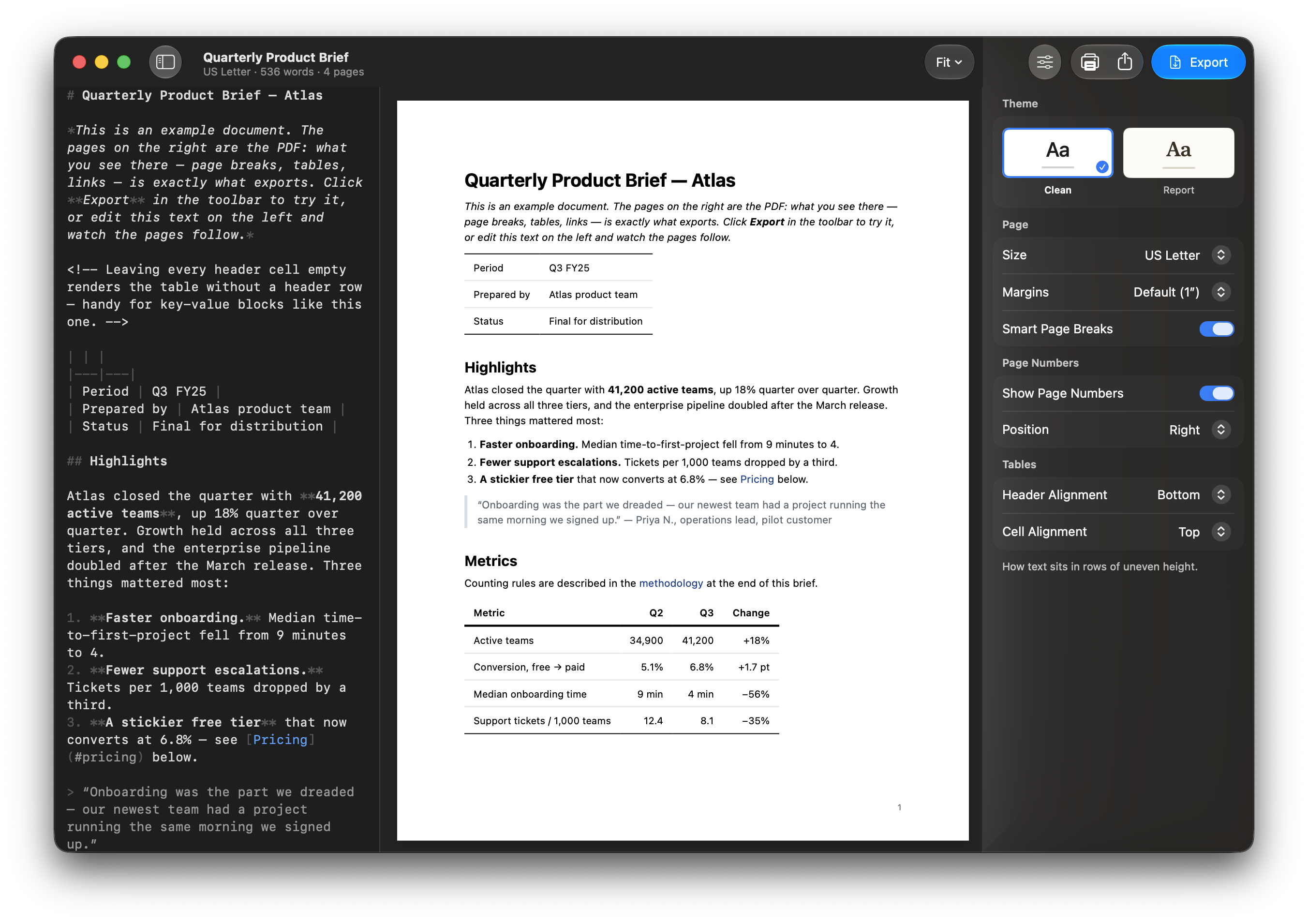
The output
Beautiful PDFs
Most Markdown tools print a web page: lines split across page breaks, tables spill, headings get left alone at the bottom of a page. MDash gets all of this right. Look closely — the difference is in the details.
01
Smart page breaks
A line is never split across pages. A heading is never stranded at the bottom of a page — it moves to the next one, together with its content. And when you want a break, insert one anywhere.
…the survey instrument was distributed to 214 participants across three cohorts, with responses collected over a six-week window and normalized before analysis. The full instrument appears in Appendix B.
Interviews were transcribed and coded independently by two reviewers. Disagreements were resolved in a joint session before the second pass.
02
Tables that look right
Horizontal rules, no gridlines — the style of a published journal, not a spreadsheet. A table always fits the page width, and its header stays with the first row.
| Run | Reads (M) | Q30 (%) | Yield (Gb) |
|---|---|---|---|
| A01 | 412 | 93.1 | 61.8 |
| A02 | 398 | 94.4 | 59.7 |
| B01 | 405 | 92.8 | 60.9 |
03
Code, wrapped and highlighted
Long lines wrap inside the block, syntax-highlighted — code never runs off the edge of the page.
The signature above is one logical line — it wraps inside the block instead of running off the page.
04
Links stay clickable
Web links stay clickable. Links within the document jump to the right page. And every document with headings gets a table of contents in the PDF's sidebar — automatically.
Coding followed the rubric in Appendix B; counting rules are described in the methodology section.
The app
A native Mac app, built like one.
What you see is what prints
The preview shows the actual pages, with the actual page breaks, as you type. What you see is the PDF — no surprises at export.
Set up the page your way
US Letter, A4, or Legal. Per-edge margins in inches or centimeters, page numbers where you want them, and two typeset themes — Clean (sans) and Report (serif).
An editor anyone can use
Syntax tinting, smart lists, ⌘B ⌘I ⌘K formatting, find, spell check, and a built-in Markdown cheatsheet. If you can type, that's enough.
Great with AI answers
Paste a ChatGPT or Claude answer and export — headings, tables, and code blocks come across intact. Even a thirty-page Deep Research report comes out properly paginated, sources still clickable, with a table of contents built from its headings.
Familiar from the start
Autosave and Versions, drag and drop, ⌘P print, one-click Share, and undo that works the way it should. Every convention your Mac already taught you.
Local and private
No accounts, no analytics, no tracking. Your documents never leave your Mac.
Questions
What is Markdown?
A plain-text way to write documents — # makes a heading, **bold** makes bold. It's also the format ChatGPT and Claude write their answers in. You don't need to know it to use MDash: there's a built-in cheatsheet, and shortcuts like ⌘B and ⌘I write the syntax for you.
Can I turn a ChatGPT or Claude answer into a PDF?
Yes — that's one of the things MDash is built for. Copy the answer, paste it into MDash, export. AI assistants write Markdown natively, so headings, tables, and code blocks come across intact. That includes the long stuff: a Deep Research report — thirty pages of headings, tables, and source links — pastes in as one document and comes out properly paginated, sources still clickable, with a sidebar table of contents built from its headings.
Will my existing Markdown files look right?
Yes — nothing changes and nothing needs converting. MDash follows the same Markdown rules as every other app, so your files keep their exact structure: the same headings, lists, and tables, just laid out for paper.
Do I need an internet connection?
No. Writing, preview, and export all run locally on your Mac. The one exception: if a document embeds an image by web address, that image is fetched when the document renders.
Where do my files go?
Documents live wherever you save them on your Mac. No accounts, no cloud, no servers — nothing to sign up for.
What happens to my files if I stop using MDash?
They're ordinary Markdown files, and they stay wherever you saved them. Any Markdown app can open them, today or ten years from now. No special format, no converting.
How much does it cost?
MDash is free to download. Unlock it with a one-time purchase — yours forever — or an annual plan that starts with a 7-day free trial. Prices are shown in the app in your local currency. MDash comes from a small team, and every purchase goes straight back into the app — new features, fixes, and keeping the output beautiful. Thank you for supporting MDash.
What macOS do I need?
macOS 15 (Sequoia) or later, on Apple silicon or Intel.
How do I cancel or get a refund?
Everything goes through Apple. Cancel a subscription anytime in your App Store account settings — to avoid being charged after the free trial, cancel at least a day before it ends. Refunds are requested directly from Apple.
What if something doesn't work, or I'm missing a feature?
Email support@usemdash.com — it goes to the developer, not a ticket queue. (Inside the app, Help ▸ Report an Issue attaches your version info automatically.) Bug reports and feature requests genuinely shape what gets built next.
Support
Stuck, curious, or found a bug? Email us — a person reads every message.
support@usemdash.com